Everything a motor vehicle claim needs, in one connected system
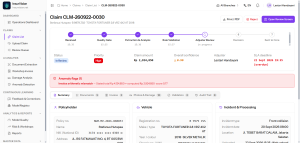
From the moment a document or photo is uploaded to the moment a claim is decided, InsurVision reads, checks, and routes every piece of evidence automatically — while keeping a human reviewer in charge of every judgment call.
Four steps, one continuous flow
Every claim — whether it arrives from a branch office, a field surveyor, or a partner workshop — moves through the same four stages.
Capture & Screen
Documents and photos come in through the web portal, the mobile app, an API integration, or a monitored folder from partner workshops. A quality gate checks every file for blur, glare, cropping, poor resolution, and even screen-photographed documents — rejecting problem files immediately and asking for a re-upload, before anything reaches extraction.
Extract & Analyze
OCR and computer vision models read identity documents, workshop invoices, and vehicle photos in parallel. Each extracted field carries a confidence score, and each detected panel or damage type is mapped against a structured vehicle diagram — so nothing is a black box to the reviewer who sees it next.
Validate & Decide
Business rules cross-check format (e.g. a 17-character chassis number), consistency between documents, validity on the incident date, invoice arithmetic, and price reasonableness against historical ranges. Claims that pass every check with high confidence move straight through; anything uncertain, high-value, or flagged for anomalies is routed to the right reviewer automatically.
Learn & Improve
Every correction an adjuster makes is captured as a labeled training example. Low-confidence and frequently-corrected cases are prioritized for review. A challenger model must outperform the current production model on a fixed evaluation set before it's ever promoted — and every promotion can be rolled back in minutes.
A closer look at each module
Vehicle document extraction & verification
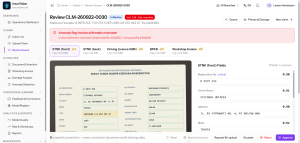
InsurVision reads vehicle registration certificates, ownership certificates, and driver's licenses, then runs four layers of automatic verification before any data reaches a reviewer:
- Format — 17-character chassis number, region-specific plate formats, national ID number length
- Consistency — chassis and engine numbers must match between the registration and ownership certificate; the owner name must match the policy record
- Validity — registration and license must be valid on the date of the incident
- Integrity — metadata inspection, edit-trace detection, and screen-photograph detection to catch tampered or re-photographed documents
Workshop invoice processing
Invoices are the hardest document type to standardize — authorized dealer workshops use clean templates, while smaller independent workshops often submit handwritten notes. InsurVision extracts:
- Header data — workshop name and tax ID, invoice number, date, plate number, work order number
- Line items — description, part code, quantity, unit price, discount, and subtotal, mapped to your parts catalog
- Footer totals — subtotal, tax, and grand total, reconciled automatically against the line items
Every invoice is checked for arithmetic accuracy (quantity × price = subtotal, and totals matching the sum of line items), price reasonableness against historical ranges, and duplication — flagging any invoice or line item that has already appeared on a different claim.
Vehicle damage photo analysis
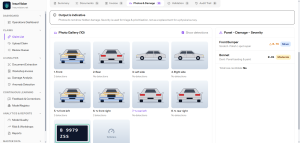
Uploaded photos go through validation (blur, angle coverage, duplicate or screen-photographed images), then panel segmentation — bumper, fender, doors, hood, roof, lights, glass, mirrors, wheels — followed by damage classification: scratches, dents, cracks, shattered parts, missing components, and severe structural deformation.
- A panel-by-panel severity summary is generated automatically, with a plain-language description of the exterior condition
- Photos identical to ones already submitted on a different claim are flagged for review
- Structural damage on certain panels can trigger a total-loss candidate indicator
Continuous learning
This is human-in-the-loop learning with scheduled retraining — not reinforcement learning — and it's built around five concrete steps:
- Feedback capture — every adjuster correction is stored as a prediction-correction pair with full context
- Active learning — low-confidence and frequently-corrected samples are prioritized for annotation
- Versioned datasets — every model can be traced back to the exact training data that produced it
- Scheduled retraining — monthly by default, or triggered by an accumulation of new corrections
- Champion–challenger evaluation — a new model must outperform the current production model on a fixed golden set before promotion, and rollback to the previous version takes minutes
Analytics & reporting
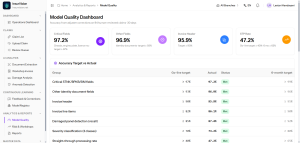
Three dashboards cover the full picture of your operation:
- Operational — daily/weekly/monthly volume by branch and document type, end-to-end and per-stage turnaround time, straight-through processing rate, backlog and workload per reviewer
- Model quality — per-field accuracy by document type, confidence distribution versus correction rate, which fields are corrected most often, and performance comparisons across model versions
- Risk — anomaly flags (duplicate photos or invoices, out-of-range pricing), severity and claim-value distribution, per-workshop anomaly trends as an early warning signal, and scheduled report delivery by email
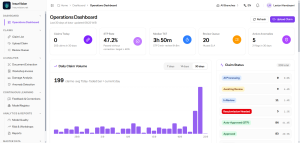
Role-based web application
One portal handles upload, review, and monitoring, with six built-in roles — Surveyor, Adjuster, Supervisor, Risk Analyst, Administrator, and Auditor — each scoped to exactly what they need:
- A side-by-side review screen: the original document on one side, extracted fields on the other, with a click-to-highlight bounding box on the source image
- Low-confidence fields are visually flagged so reviewer attention goes where it's actually needed
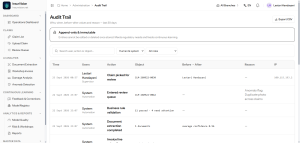
- Every correction, override, and configuration change is logged — who, when, the value before and after, and why
How a claim moves through the system
Web upload · Field mobile app · API integration with your core system · Monitored folder from workshops
Quality gate · Document classification · Pre-processing (de-warp, de-skew) · Retry management
OCR & field extraction · Invoice table recognition · Damage detection · Plate recognition & anomaly signals
Format · Cross-document consistency · Validity dates · Arithmetic · Price reasonableness · Confidence scoring
JSON/API to your core claim system · Document archive · Structured storage and model registry
What to expect
Initial targets agreed with the client during discovery, measured on a frozen golden set from production data.
| Metric | Target at Go-Live | After 6 Months |
|---|---|---|
| Critical field accuracy (registration & ownership certificates) | 97% | 99% |
| Other identity field accuracy | 93% | 96% |
| Invoice header accuracy | 90% | 95% |
| Invoice line-item accuracy | 82% | 90% |
| Damage panel detection | 85% | 92% |
| Straight-through processing rate | 40% | 65% |
Speed: identity documents ≤ 5 seconds · invoices ≤ 10 seconds per page · a full photo set ≤ 45 seconds · end-to-end ≤ 3 minutes (p95).
Security & compliance
Built in line with Indonesia's Personal Data Protection Law (UU No. 27/2022) — claim documents carry sensitive personal data, and that's treated as a core requirement, not an afterthought.
End-to-end encryption
Data encrypted at rest and in transit (TLS 1.2+).
Granular access control
Least-privilege, role-based access; Active Directory / OIDC integration.
Immutable audit trail
Every user and system action is logged for audit purposes.
Environment separation
Production data is never used raw in development environments.
File scanning
Every upload is checked for malicious content.
Financial-sector alignment
Aligned with risk management and IT outsourcing regulations.
See InsurVision on your own claims
Schedule a walkthrough with your team's actual document types and claim volume.
Schedule a Demo